
Share
Somewhere in your home, there's probably a spindle or a shoebox of DVDs with handwritten labels: "Wedding 1994," "Kids' Birthdays," "Grandma's 80th." Maybe a transfer shop made them from your old tapes. Maybe they came out of a DVD recorder hooked to the family VCR, or a little DVD camcorder.
Back then, those discs felt like the finish line. The memories were saved. Done.
But here's what's happened since: DVD players have quietly disappeared from our living rooms, computers stopped coming with disc drives, and recordable discs don't stay perfect forever. For a lot of families, those DVDs are now the only copy of the original tapes, and fewer and fewer machines can play them.
The good news? If your DVD still plays, you can save it, today, at home, without a computer. Here's how.
(This guide is for your home movies, family recordings and other material you own or have permission to copy.)
The Rescue Tool Is Probably Already in Your Closet
Every DVD player ever made has video output jacks on the back, the familiar red, white, and yellow RCA plugs, and often an S-Video port too. That's your way out.
The setup is the same one our customers use for tapes, with a DVD player standing in for the VCR:
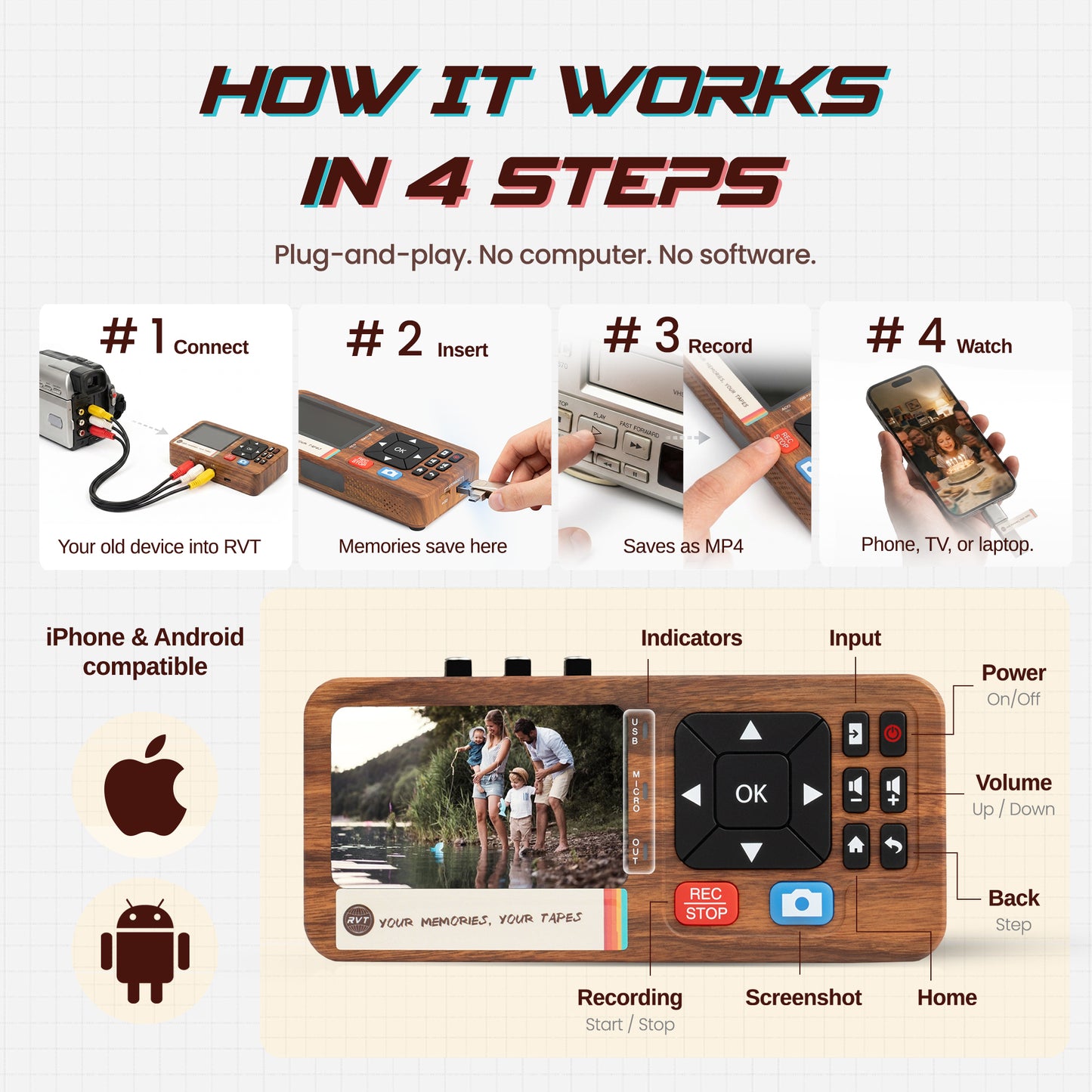
📀 DVD player → 🔌 RCA or S-Video cables → 📼 RetroVision Digitizer 3.0 → 💾 modern video file
Press play on the DVD player, press record on the Digitizer, and it captures your home movie as a file you can watch on your phone, your TV, or your laptop, and share with the whole family. No computer. No software to learn. No monthly anything.
Step by Step: DVD to Digital File
1. Set up your player. Any DVD player with RCA (red/white/yellow) or S-Video outputs works, the one in your closet, or a $15 thrift-store find. If you have a choice, S-Video gives a slightly cleaner picture than the yellow plug.
2. Connect it to the Digitizer 3.0. Video and audio cables from the player's outputs to the Digitizer's inputs. Same hookup you'd use for a VCR or camcorder.
3. Give the disc a quick wipe. Soft cloth, straight lines from the center out to the edge, never circles.
4. Play and record. Start the DVD from its menu, hit record, and let it run. Capture happens in real time, so a two-hour disc takes two hours, a good excuse to watch the wedding again. If the disc has chapters or several tapes on it, you can capture them as separate recordings so each event gets its own file.
5. Check your file. Play back the beginning, middle, and end. Make sure the sound is there.
6. Name it like it matters. "1994-06 Wedding. Sarah & Tom" will still make sense in thirty years. "VIDEO_01" won't.
7. Back it up twice. Keep copies in at least two places, your computer plus an external drive is a great start. And don't throw away the discs (or any surviving tapes!) once you're done. Preservation means adding copies, never subtracting them.
Which DVD Player Should You Grab?
If the closet turns up empty, skip the cheap no-name players at the big-box store. Collectors who live and breathe this stuff will tell you the older players were just built better, heavier construction, stronger disc mechanisms, lasers that last. The shortlist: a used Panasonic or Sony from the early-to-mid 2000s. Thrift stores, eBay, and Facebook Marketplace are full of them, usually $15-40. Panasonic has the best reputation for picture quality; Sony players are known for being friendly with burned DVD-R discs, which is exactly what your home movies are on.
Got tapes and discs? Look at a Toshiba DVR620 or an LG DVD/VHS combo — one machine that plays both, and it hooks up to the Digitizer the same way.
Two things before you buy: make sure the original remote is included (a lot of DVD menus can't be navigated without it, and you need the menu to capture events one at a time), and pass on the later Magnavox, Funai, and Sylvania combo units, their track record for reliability isn't great. The full comparison table is in our Learn Center guide.
The Disc That Plays in Your DVD Player but Not Your Computer
Here's something that surprises people. Many home DVDs were recorded on machines that never "finalized" the disc, a technical step that makes it readable everywhere. An unfinalized disc often won't show up in a computer at all, but plays just fine in a DVD player.
If you've ever put a home DVD in a computer and gotten nothing, this is probably why, and it's exactly the kind of disc the play-and-capture method rescues. If it plays on a screen, the Digitizer can save it.
The Honest Fine Print
We promise to always tell you the whole story, so here it is: if you're comfortable with computers and own a disc drive, free software can copy a DVD's video files directly, with zero quality loss. It's a solid option for the tech-savvy, we cover it in our Learn Center guide.
For everyone else, the play-and-capture method is the practical path, and because home-video DVDs were made from standard-definition tapes in the first place, the difference for family footage is modest. What actually puts memories at risk isn't choosing one method over the other. It's the disc sitting in a closet, waiting, while the players disappear.
Save Them While They Still Play
Your family already paid to preserve these memories once. The discs did their job, they carried your tapes across twenty years. Now it's time to carry them the rest of the way: onto files you own, stored where you choose, playable on the screens your family actually uses.
Want the full walkthrough, including mini DVDs from camcorders, discs that skip, and how to organize everything after? It's free in the Learn Center: How to Save Home Movies Off Old DVDs.
And if your originals are still on tape. VHS, VHS-C, Video8, Hi8, MiniDV, the RetroVision Digitizer 3.0 handles those the exact same way: one button, no computer, backed by a 30-day money-back guarantee, 2-year warranty, and real USA-based support.
Your memories. Your tapes. Digitize everything, regret nothing.
This article is for general educational purposes and focuses on home videos, personally created recordings, and other material you own or are authorized to copy. Copyright and copy-protection laws vary by place; owning a disc doesn't automatically grant permission to copy everything on it. RetroVision does not provide instructions for bypassing copy protection.