
Share
Somewhere between 2000 and 2015, a lot of families made a smart move. They boxed up their VHS tapes, paid a shop to put everything on DVD, and finally felt like the job was done. Graduations, wedding days, the kids at age three, all of it on a shelf in a nice little plastic case.
Here's the problem: it wasn't done. Not even close.
DVDs were never meant to be permanent storage. They were a convenience format, a step up from VHS in terms of image quality and durability, but still physical media with a shelf life. And for a lot of those discs, that shelf life is running out right now.
The RetroVision Digitizer fixes this. It connects directly to any standard DVD player using the RCA cables you've probably had in a drawer for twenty years, captures the video in real time, and saves it as an MP4 to a USB drive or SD card you keep. No computer required. No account to create. No one else's hands on your stuff.
Why Your DVDs Are in Danger Right Now
A DVD looks like a solid, durable object. It's not. Under that shiny surface is a thin layer of dye that a laser reads, and that dye breaks down over time. Heat, humidity, scratches, oxidation. The technical term is "disc rot," and it's more common than most people realize.
Research from the Library of Congress has found significant failure rates in recordable discs. DVD-R and DVD+R, which is exactly what most digitizing services used, within 10 to 25 years. If your DVDs were made between 2000 and 2012, you're in that window right now. Some of those discs are already starting to go.
There's a hardware problem on top of that. Laptops don't ship with DVD drives anymore. Most smart TVs don't have them either. Even if your discs are still readable, the players you need to watch them are disappearing fast. A collection of DVDs sitting in a closet without a working player isn't a preservation strategy, it's a waiting game.
Why the RVT Digitizer Works with Any DVD Player
Most people think of digitizers as VHS tools. That's what ours was originally designed for. But here's the thing almost nobody mentions: a DVD player and a VHS player output their signal the exact same way.
Both use composite video, red, white, and yellow RCA cables. Red and white for stereo audio, yellow for video. That's the universal handshake between a source device and a screen, and it hasn't changed in 30 years. The RVT Digitizer reads that signal. It doesn't care whether it's coming from a VCR or a DVD player, it just captures whatever's going out.
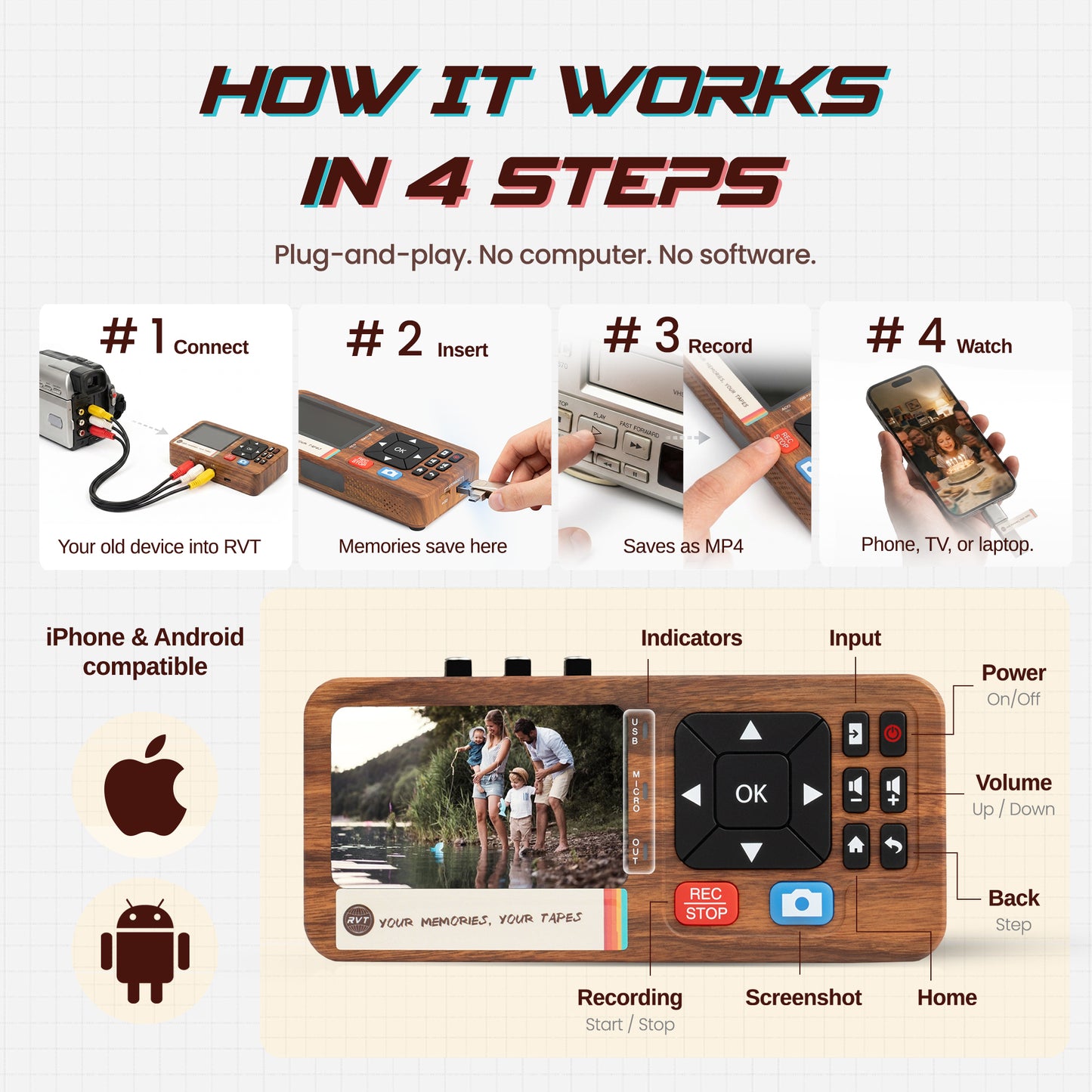
Connect your DVD player's output to the Digitizer's input. Insert a USB drive or SD card. Hit record. Press play. That's it. The Digitizer writes a clean MP4 file directly to your drive in real time, no rendering, no conversion step, no software. When the disc finishes, so does the capture.
It works with standalone DVD players, DVD/VCR combos, disc changers, and most portable DVD players, anything with standard composite outputs. If it can connect to a TV through those three colored cables, we can capture from it.
Step-by-Step: How to Digitize a DVD at Home
No technical experience needed. If you've ever used a DVD player, you can do this.
- Gather your gear. DVD player, RVT Digitizer, the included RCA cable, and a USB drive or SD card. Budget about 2-4 GB of space per two hours of footage.
- Connect the cables. Plug the yellow, red, and white ends from your DVD player's AV output into the matching inputs on the Digitizer. Color to color, hard to get wrong.
- Insert your storage. USB drive into the Digitizer's port, or SD card into the slot. This is where the finished file lands.
- Power on the Digitizer. The small built-in screen shows a live preview of the signal. Confirm you're getting a picture before you start.
- Hit REC, then hit Play. Press record on the Digitizer, then start your DVD. The Digitizer captures everything in real time, exactly as it plays, no shortcuts.
- Press STOP when it ends. The file is already saved. No waiting, no rendering. Done.
- Check it and back it up. Plug the drive into a TV or computer, make sure the file looks right, then copy it to a second location. Hard drive, external drive, private cloud, whatever you prefer.
Your Files, Your Storage. Nobody Else's Server
When you mail your discs to a digitizing company, the files typically land on their platform. Sometimes you can download them. But you're dependent on that company staying solvent, keeping your account active, and not changing their policies. Services shut down. Plans change. We've watched it happen to customers of multiple digitizing companies over the years.
With the RVT Digitizer, your file goes straight to your drive. It never touches anyone else's server. You pick where it lives, a hard drive in your office, a USB stick in a fireproof safe, your parents' backup drive, your own cloud storage. No login required to watch it, ever. No account that can expire.
Who Should Be Doing This Now. Not Later
You had VHS tapes put on DVD between 2000 and 2015. Those discs are squarely in the danger zone for disc rot. This is the most urgent group, and it's a big one.
You recorded straight to DVD using a home recorder. Birthday parties, soccer games, school plays, recordable DVD-R and DVD+R discs are among the least stable formats ever made for home use. If you recorded your own content this way, the clock is ticking.
Your DVD player is dying or already dead. Once you lose the hardware, the window closes. A working player is what makes any of this possible.
Your parents or grandparents have boxes of discs nobody's dealt with. Collections sitting in closets for years, waiting for someone to get around to it. Don't let "getting around to it" become "we lost everything when they moved."
Why Not Just Use a Mail-In Service?
Digitizing services exist for a reason, some people genuinely want someone else to handle it. But the tradeoffs are real. Shipping means your irreplaceable discs are in a box on a truck, handled by people you've never met. Professional DVD digitizing runs $10-$25 per disc, sometimes more. A family with 25 discs is looking at $250-$600, often more than the Digitizer itself costs. Turnaround is usually days to weeks. And the output often lives on their platform, not yours.
The RVT Digitizer is a one-time purchase. It handles DVDs and VHS tapes. You do it in your living room, on your schedule, and the files are yours from the moment recording stops.
Frequently Asked Questions
Does this really work with any DVD player?
If your DVD player has the standard red/white/yellow RCA output, and the vast majority made in the last 25 years do, yes, it works. Standalone players, DVD/VCR combos, multi-disc changers, and most portables with RCA output all connect the same way.
Do I need a computer?
No. The Digitizer is completely standalone. It captures and saves directly to a USB drive or SD card. A computer is useful afterward for organizing and backing files up, but you don't need one during the actual capture.
What format does it save in?
MP4, the most universally compatible video format there is. It plays on iPhones, Android phones, Macs, Windows PCs, smart TVs, and essentially any device made in the last decade.
What about DVD menus and chapter markers?
Navigate to your main title in the DVD menu before hitting record, and you'll get a clean start-to-finish capture. Chapter markers and interactive menus won't carry over, you're capturing the video, not the disc structure.
My DVD is scratched. Will it still work?
The Digitizer captures what your player can read. If the player can push past the damage and play the content, the Digitizer will capture it. For partially degraded discs, this is often the best recovery option available.
Can the same Digitizer handle my VHS tapes too?
Yes, same device, same cables, same process. Hook up a VCR for tapes, a DVD player for discs. Your whole mixed collection, one tool.
Do It Before You Have To
The people who lose their home movies aren't careless. They're just the ones who kept meaning to get to it, and then something happened. The player stopped working. The disc finally gave out. A move, a flood, a death in the family, and suddenly that box of DVDs is gone.
Preserving this stuff isn't complicated, and it doesn't require expertise. It just requires not waiting until the decision gets made for you.
Your kids at five years old, your parents when they were young, the graduation party you threw twenty years ago, it's still on those discs. Get it somewhere it'll actually last.
Since writing this, we've built a complete free DVD guide in the Learning Center, including which used DVD players are worth buying and what to do with discs a computer can't read.