Your family’s VHS tapes are fading, and those priceless memories could be lost for good if you wait. Magnetic tape starts to break down after 15 years, so by 2025, your home videos may be at risk.

This guide will show you how to convert vhs tapes to digital using clear, step-by-step instructions. You’ll learn which equipment works best, how to prepare your tapes, and the easiest way to capture every moment.

We’ll compare the top digitizers, share post-conversion tips, and make the process simple for anyone. Ready to preserve your memories forever? Let’s get started.

Why Convert VHS Tapes to Digital in 2025?

Every year, more families discover that their treasured VHS tapes are fading. The window to save these memories is closing fast. If you want to convert vhs tapes to digital, 2025 may be your last real chance to act before footage is lost forever.

Why Convert VHS Tapes to Digital in 2025?

The Risks of Waiting: Tape Degradation and Loss

VHS tapes were never meant to last forever. The magnetic tape inside starts to break down after 15-20 years. By 2025, most tapes from the 1990s and early 2000s will show signs of color fading, static, or even total loss.

Many families have learned too late that their tapes could not wait. A wedding video left on a shelf became a blurry mess. A child’s first steps were lost forever. The cost of professional restoration is high, often much more than timely digitization.

If you convert vhs tapes to digital before severe damage sets in, you avoid these heartbreaks. Acting now preserves your memories at their best.

Benefits of Digital Conversion

When you convert vhs tapes to digital, you create a permanent backup that never fades. Digital files don’t degrade, no matter how many times you watch or share them.

You can easily send clips to family, upload to social media, or play them on any modern device. Want to edit out blank spots or add titles? Digital makes it simple. Backups can be stored on external drives or in the cloud, keeping your memories safe from fire or flood.

Plus, digital organization lets you sort and catalog events, making it easy to find that special birthday or holiday moment.

Industry Trends and Consumer Demand

The urgency to convert vhs tapes to digital has never been higher. The market for digitization is booming, with families and creators realizing time is running out. Over 37,000 customers have already used Kodak’s digitizing services, showing massive demand.

More people are aware that analog media is at risk. According to Digital Converters Highlights Growing Demand for VHS and Photo Digitisation in the UK, the call to preserve old tapes and photos is growing rapidly as more realize the effects of tape degradation.

Whether you want to save family events or classic game footage, now is the moment to act.

Common Concerns and Misconceptions

Some worry that to convert vhs tapes to digital is too hard or expensive. But with modern solutions like the RVT Digitizer, the process is plug-and-play. You get industry-leading clarity without the risks of cheap converters.

Others believe DIY results can’t match professionals, but with the right equipment, families get archival-grade preservation at home. Privacy is also protected, since your tapes never leave your hands.

Don’t let myths or hesitation stop you. The right tools make saving your memories easy, safe, and rewarding.

Essential Equipment and Software for VHS-to-Digital Conversion

Preserving family movies or creative projects starts with the right gear. To convert vhs tapes to digital safely and with the best quality, you need a few essential items. Let’s break down what you need, why it matters, and how to avoid common pitfalls.

VHS Players and Tape Condition

A working VCR is the heart of any effort to convert vhs tapes to digital. If you no longer own one, check with local rental shops, thrift stores, or online marketplaces for reliable units. Before you begin, inspect each tape for mold, broken reels, or visible damage.

Carefully clean your tapes using a soft cloth and ensure they’re rewound. If a tape feels sticky or won’t play smoothly, do not force it. Damaged tapes can ruin both your memories and the VCR. For stubborn issues, consider consulting a specialist before proceeding.

Video Capture Devices: What to Look For

To convert vhs tapes to digital, you’ll need an analog-to-digital converter. Options range from basic USB dongles to advanced capture cards. While budget devices might seem tempting, they often cause dropped frames, washed-out colors, and audio sync problems.

Professional-grade solutions, like the RVT Digitizer, deliver crisp video and accurate sound. Here’s a quick comparison:

Device Type Pros Cons
Cheap USB Dongle Low upfront cost Poor quality, unreliable
Capture Card Decent quality Setup complexity
RVT Digitizer Archival clarity, plug-and-play Higher initial cost, but saves memories

For family keepsakes or creative archives, reliable performance is worth the investment.

Why Choose the RVT Digitizer by Retrovision Technologies Inc?

The RVT Digitizer stands out when you want to convert vhs tapes to digital with confidence. Engineered for precision, it captures every detail and preserves true-to-life color and sound. Families have used it to safeguard wedding videos and birthday parties, while creators trust it for archiving rare footage.

Step-by-Step Guide to Convert VHS Tapes to Digital in 2025 - Why Choose the RVT Digitizer by Retrovision Technologies Inc?

Plug it in, connect your VCR, and enjoy fast transfer speeds. The RVT Digitizer supports VHS, Hi8, MiniDV, and camcorder input. With lifetime reliability and U.S.-based support, it’s trusted by professionals who value archival-grade results. Why risk your memories with anything less?

Required Cables and Accessories

To convert vhs tapes to digital, gather RCA (red, white, yellow) or S-Video cables to connect your VCR to the digitizer. Some setups may need a SCART adapter, especially with European equipment. Use USB 3.0 or Thunderbolt connections for fast, stable data transfer to your computer.

For storage, choose a reliable external hard drive, SSD, or reputable cloud solution. Proper cables and accessories prevent headaches and help you get perfect results the first time.

Software for Capturing and Editing

User-friendly capture software is key to a smooth process. The RVT Digitizer includes intuitive tools, but you can also use trusted third-party apps. When you convert vhs tapes to digital, keep editing simple: trim unwanted scenes, adjust colors, and add basic titles.

Popular file formats include MP4, AVI, and MOV. MP4 is recommended for most families because it balances quality and compatibility. Organize your files clearly so memories are easy to find and share.

Ready to preserve your memories? Choose the RVT Digitizer for industry-leading results and peace of mind. Start your conversion journey today.

Step-by-Step Process: Converting VHS Tapes to Digital

Ready to preserve your precious memories? Here’s your step-by-step guide to convert vhs tapes to digital with confidence. Whether you’re digitizing a single wedding video or an entire family archive, these instructions ensure you get the best quality—fast, safe, and simple.

Step-by-Step Process: Converting VHS Tapes to Digital

Step 1: Gather and Inspect Your VHS Tapes

Start your journey to convert vhs tapes to digital by collecting all your tapes. Make a list and sort them by importance—think birthdays, graduations, or family vacations. Label each tape clearly so nothing gets lost in the shuffle.

Next, inspect each tape for physical damage. Look for cracked shells, mold, or stuck reels. If you find dust or mild mold, gently wipe the exterior with a soft, dry cloth. For severe issues, consult a professional before you attempt to convert vhs tapes to digital. A little prep now can save you heartbreak later.

Step 2: Set Up Your Equipment

To convert vhs tapes to digital, you’ll need a reliable VCR and the RVT Digitizer. The RVT Digitizer is trusted by professionals and families alike for its industry-leading clarity and effortless setup.

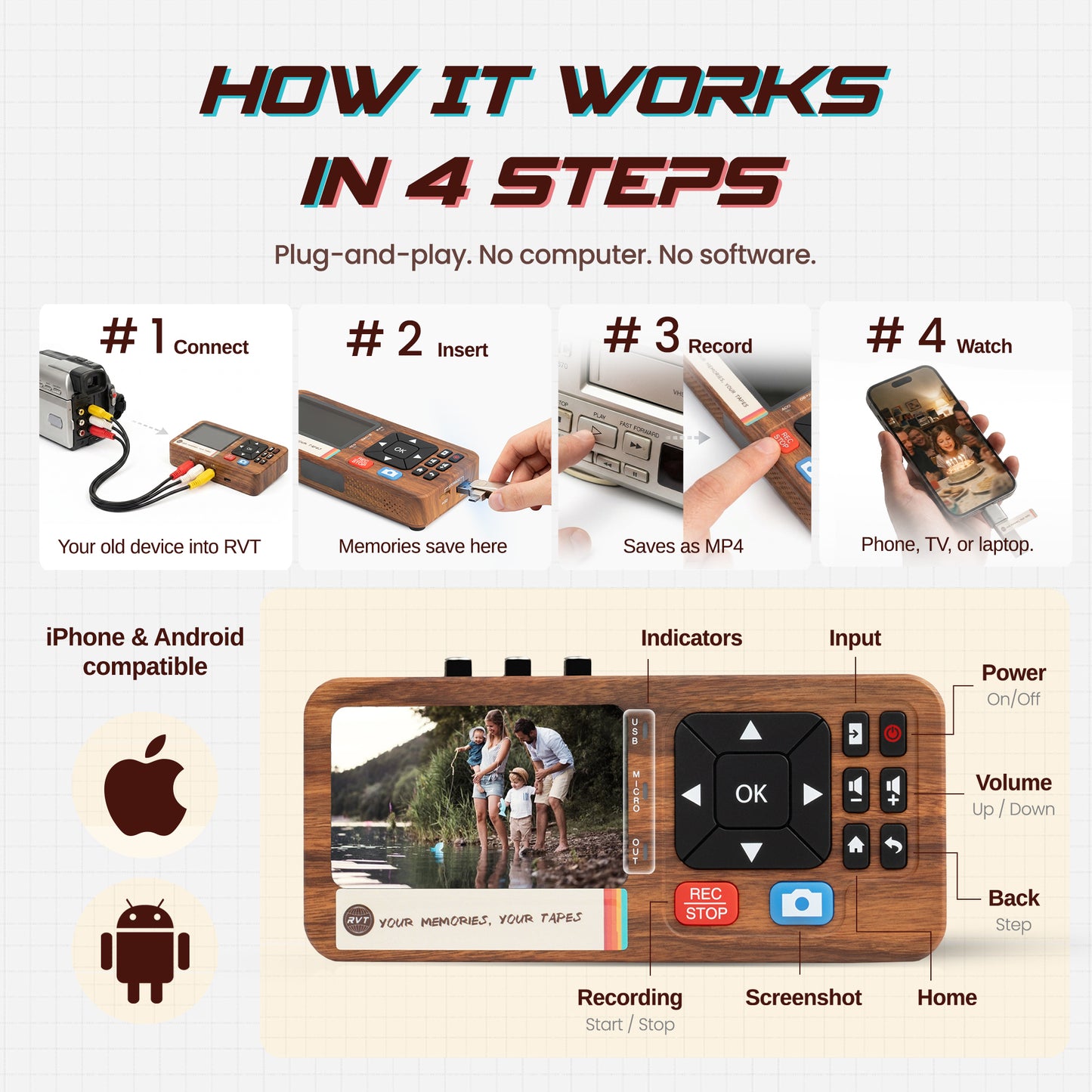
Connect your VCR to the RVT Digitizer using RCA or S-Video cables. Plug the digitizer into your computer’s USB port. The RVT Digitizer is plug-and-play, so it detects most devices automatically. If prompted, install the provided software or drivers—it only takes a minute.

Picture a family setting up in their living room, excited to see old memories spring to life. You don’t need to be a tech expert. The RVT Digitizer is engineered for precision and makes the process accessible for everyone.

Step 3: Configure Capture Settings

Now, open your capture software. Select the correct input source—composite (RCA) or S-Video. For the best results when you convert vhs tapes to digital, choose a resolution of 720x480, which matches VHS quality.

Test the audio levels by previewing a few seconds. Make sure voices are clear and in sync. Adjust the settings if needed—better to catch issues now than after the transfer. This step ensures you capture every detail and sound, preserving your memories with archival-grade accuracy.

Step 4: Begin the Conversion

Insert your first tape and rewind to the beginning. Press play on the VCR, then hit “Record” in your capture software. Monitor the process as you convert vhs tapes to digital, watching for color shifts, dropped frames, or audio glitches.

If you notice problems, pause and adjust tracking on the VCR. For long tapes, you can capture in segments. Picture capturing a two-hour birthday party in real time—every laugh and song saved forever. For a detailed walkthrough, check out this Step-by-step guide to converting VHS.

Step 5: Save and Back Up Your Digital Files

When the tape finishes, stop recording. Save your file in MP4 format for universal compatibility. Immediately back up your files to an external hard drive, SSD, or secure cloud storage. This is a crucial part of the process to convert vhs tapes to digital safely.

Organize your files with clear names and folders. For example:

1997_Family_Reunion_VHS.mp4

Create a master folder for each year or event. Redundant backups protect your memories from accidental loss.

Step 6: Basic Editing and Enhancement

Even the best footage benefits from a little polish. Use simple editing software to trim blank sections, adjust color, or boost audio. Add chapter markers for special moments, like cake-cutting or school plays.

Export your final versions in your preferred format. This step ensures your digital archive is easy to watch, share, and enjoy for years to come. Editing is another reason why families and creators choose to convert vhs tapes to digital themselves—full control and peace of mind.

Troubleshooting Common Issues

Occasionally, you may hit a snag while you convert vhs tapes to digital. If you see playback errors or tracking lines, adjust the VCR’s tracking dial. For audio dropouts, clean the tape head or check your cables.

If the software crashes or hardware conflicts arise, restart your computer and reconnect the RVT Digitizer. Severely damaged tapes may need professional help—don’t risk irreplaceable footage. Remember, the RVT Digitizer is trusted by archivists for its lifetime reliability and U.S.-based support.

Ready to protect your memories? Choose the RVT Digitizer for industry-leading results. Preserve your legacy with confidence—there’s no better way to convert vhs tapes to digital and keep your family’s history alive.

Comparing Conversion Methods: DIY vs. Professional Services

Are you torn between doing it yourself or sending your tapes out? When you want to convert VHS tapes to digital, both paths have clear differences. Let’s break down what each method means for your memories.

Comparing Conversion Methods: DIY vs. Professional Services

DIY Conversion: Pros and Cons

Choosing to convert VHS tapes to digital at home means you stay in control. You decide which tapes to prioritize, how to organize files, and when to work—no need to ship irreplaceable memories away. Privacy is a big plus, especially for family events or personal footage.

DIY is also cost-effective in the long run. After buying the right gear, like the RVT Digitizer, you can convert a whole collection at your pace. The RVT Digitizer stands out for its easy setup and industry-leading clarity, making it simple for anyone to achieve professional results at home.

However, DIY takes a little patience. There’s a learning curve, especially if you haven’t handled old tech in a while. Some budget devices risk poor transfers with missing colors or sound issues. Still, with the right equipment and step-by-step guidance, families and creators can convert VHS tapes to digital safely, quickly, and with peace of mind.

Professional Mail-In Services

Mail-in services promise convenience: box up your tapes, send them off, and wait for digital files to arrive. This method works best if you have little time or if tapes are badly damaged and need expert repair.

Professionals can restore footage, fix tracking, and sometimes save tapes others can’t. But this comes at a price. Each tape can cost $20 to $40, and you might wait four to twelve weeks for results. Handing over your originals means trusting someone else with precious memories, which can be stressful.

If you want to convert VHS tapes to digital without hassle and don’t mind the wait or expense, this route is an option. Still, many families prefer to keep their tapes close and in their care.

Quality and Reliability: The Deciding Factors

Quality matters most when you convert VHS tapes to digital. Low-cost converters often drop frames, blur colors, or lose audio sync, leaving you with disappointing results. Mail-in services usually do better, but you lose control and may still face issues if your tapes are fragile.

The RVT Digitizer is engineered for precision, trusted by professionals, and delivers archival-grade preservation. Unlike cheap alternatives, it captures every frame with true-to-life color and sound. Want to see how leading devices stack up? Check out this Comparing VHS to digital converters page for a side-by-side look at performance and features.

For families and creators, reliable results mean everything. That’s why the RVT Digitizer is the clear choice for preserving what matters.

Cost Comparison

Let’s talk numbers. DIY requires a one-time investment in hardware, but the savings add up fast. For example, the RVT Digitizer lets you convert VHS tapes to digital as many times as you need, with no extra fees. If you have a box of tapes, the cost per tape drops with each conversion.

Mail-in services, in contrast, charge for each tape and can become expensive for large collections. Plus, you pay for shipping and sometimes extra for rush jobs or repairs.

Here’s a quick breakdown:

Method Upfront Cost Cost Per Tape Turnaround Time Privacy
DIY (RVT Digitizer) One-time None Instant Full Control
Mail-In Service None $20–$40 4–12 weeks Lower

Ready to convert VHS tapes to digital the safe, easy, and reliable way? Choose the RVT Digitizer for the best picture clarity, lifetime reliability, and total peace of mind. Preserve your memories today.

Best Practices for Digital Preservation and Sharing

Preserving your memories for the long haul means thinking beyond just how to convert VHS tapes to digital. The choices you make now will determine how easy it is to access, protect, and share your family’s stories for generations. Let’s break down the best ways to ensure your digital files stay safe, organized, and ready to enjoy.

File Formats and Storage Solutions

Selecting the right file format is the first step when you convert VHS tapes to digital. MP4 (H.264) is highly recommended because it balances quality and universal compatibility. This format plays smoothly on phones, tablets, and smart TVs. For extra peace of mind, consider saving a second copy in MOV or AVI.

Next, choose reliable storage. External hard drives and SSDs offer fast access and plenty of space. Cloud storage is a smart backup, letting you access your videos anywhere. For the highest quality transfer and long-term safety, trust the RVT Digitizer product details to give you archival-grade digital files every time.

Organizing and Cataloging Digital Memories

After you convert VHS tapes to digital, keeping your files organized is key. Start with simple, clear folder structures. For example, create main folders for each year or event: “1998 Family Vacation” or “Grandpa’s Birthday.”

Use descriptive file names for each video, like “1998-07-04_FamilyPicnic.mp4.” Add basic metadata if your software allows—details like date, location, and people featured make files easier to find. This simple approach turns a box of tapes into a searchable, digital family archive that will be treasured for years.

Sharing with Family and Friends

Once you convert VHS tapes to digital, sharing those precious memories is a breeze. Copy highlights to a USB drive, burn them to DVD, or create private cloud links for relatives far away. Many families enjoy making highlight reels or short montages for birthdays and reunions.

Always test your files on different devices to ensure everyone can watch them. Keeping videos in the MP4 format helps guarantee smooth playback across phones, tablets, and smart TVs. This makes reliving your memories together easy and fun.

Protecting Your Digital Files

After you convert VHS tapes to digital, take steps to protect your new library. Back up your files to at least two locations, such as an external hard drive and a cloud account. Set a reminder to check your files every year or two for data integrity.

Store any original tapes in a cool, dry place if you want to keep them. For more tips and answers to common concerns, visit the RVT Digitizer product details page. Ready to safeguard your memories? Use the RVT Digitizer, trusted by professionals for industry-leading results.

Frequently Asked Questions About VHS to Digital Conversion

Have questions about how to convert vhs tapes to digital and keep your memories safe? You are not alone. Families and creators often wonder about timelines, tape condition, and which equipment really delivers. Below, we answer the most common concerns, drawing on industry-leading experience and trusted solutions. For even more details, visit our Frequently asked questions about VHS conversion.

How Long Does the Process Take?

When you convert vhs tapes to digital at home, expect each tape to transfer in real time. A two-hour tape takes about two hours to digitize. Most families can convert a tape in an evening, then edit or back up the file.

Professional services may take four to twelve weeks, since you have to ship tapes and wait for processing. With the RVT Digitizer, you can move at your own pace and see instant results. This gives you more control and faster access to your memories.

What If My Tapes Are Damaged or Moldy?

It is common to find old tapes with mold or minor damage. Before you convert vhs tapes to digital, check each tape for white spots, stuck reels, or crinkled sections. Gently clean cases and use a soft cloth for exterior dust.

For tapes with heavy mold or stuck reels, ask a specialist before attempting playback. The RVT Digitizer is engineered for precision and can often handle minor tape issues safely, but always prioritize protecting your originals.

Can I Convert Other Formats (Hi8, MiniDV)?

Yes, you can convert vhs tapes to digital along with other analog formats like Hi8 and MiniDV. The RVT Digitizer supports multiple input types, including camcorder cables and adapters.

Just connect the right player (like a Hi8 camcorder) to the digitizer, set your capture software, and start converting. This flexibility helps families and creators preserve a variety of legacy footage in one simple workflow.

Is There a Risk of Losing My Originals?

When you convert vhs tapes to digital yourself, you keep your tapes close at hand. This reduces the risk of loss or damage that can happen with mail-in services. Always handle tapes gently, store them in a cool, dry place, and avoid exposing them to magnets.

The RVT Digitizer process does not harm your originals. After digitizing, you will have both the digital copy and the physical tape for added peace of mind.

What Are the Ongoing Costs?

Many ask if it is expensive to convert vhs tapes to digital. With the RVT Digitizer, there is a one-time investment. No recurring fees, no shipping charges, and software updates are included.

Compare this to mail-in services, which can cost $20 to $40 per tape. For large collections, the savings add up quickly, making the RVT Digitizer the smart choice for families and creators.

Is Technical Knowledge Required?

The RVT Digitizer is designed for anyone to use, even if you have never tried to convert vhs tapes to digital before. Just plug in your cables, install the included software, and follow on-screen prompts.

Helpful guides and community forums are available if you need support. Most users set up in minutes and start preserving memories right away.

What Makes the RVT Digitizer Different?

Not all converters are equal. The RVT Digitizer is trusted by professionals and families for its industry-leading clarity, archival-grade results, and lifetime reliability. It is engineered for precision, capturing every frame and sound detail.

You get fast transfer speeds, support for all major formats, and U.S.-based support when you need it. Ready to preserve your family’s history? Choose the RVT Digitizer for a safe, simple, and high-quality experience.

Looking back on old VHS tapes brings a rush of memories—birthday parties, first steps, and moments you don’t want to lose. You’ve seen how fast those tapes can fade over time, and now you know why 2025 is the year to act before it’s too late. With the RVT Digitizer, you can protect every laugh and milestone in digital clarity, all from the comfort of home. Ready to preserve your family’s story or that classic gameplay session for good? Why risk losing it another year? It’s time—Digitize my tapes today.

Back to blog