Remember the thrill of popping a VHS tape into the VCR, hearing that gentle whir, and watching treasured moments flicker to life? Even in 2025, those tapes hold stories that matter—family milestones, school plays, forgotten home movies. Yet, time is not kind to VHS. The picture fades, colors blur, and every playback risks losing a little more.

Today’s digital world sets a new standard for clarity and sharing. That’s why upscaling vhs is more vital than ever. In this guide, you’ll discover how to rescue your memories step by step—from understanding tape limits and picking the best gear to leveraging AI for restoration and future-proofing your digital files.

Ready to preserve your history in stunning quality? Let’s get started.

Understanding VHS Quality Limitations in 2025

VHS tapes hold decades of memories, but in 2025, their weaknesses are clearer than ever. Families and creators looking to preserve their history face a race against time. Let’s explore why upscaling vhs is now a must, not just a nice-to-have.

Understanding VHS Quality Limitations in 2025

The Physical and Technical Constraints of VHS

VHS tapes are analog, which means they’re subject to gradual decay. The native resolution is low, between 240 and 480p, so even the best footage looks soft and muted compared to digital video. Over time, you’ll notice tracking errors, color bleeding, static, and dropouts. Storage conditions and frequent playback accelerate damage, making it harder to recover clear images. As VCRs become rare and parts harder to find, upscaling vhs becomes even more urgent. According to VHS tapes degrade 10-20% over 10-25 years, most tapes already show visible loss, putting precious moments at risk.

Why Upscaling is Essential for Preservation

Today’s 4K and 8K screens reveal every flaw in old footage. Simply digitizing is not enough—upscaling vhs actually enhances clarity and brings colors back to life. If you do nothing, you risk losing irreplaceable content as tapes degrade or become unplayable. Industry experts estimate over 60% of VHS tapes lose significant quality after 20 years. Imagine seeing a side-by-side: the raw capture looks faded and noisy, while the upscaled version feels vibrant and sharp. Upscaling vhs bridges the gap between nostalgia and modern viewing standards, ensuring your memories look stunning for years.

The Digital Divide: Analog-to-Digital Challenges

Turning analog tapes into digital files comes with hurdles. Signal noise and interlacing can cause flickering and motion issues. Frame rates often mismatch, creating playback problems on modern devices. Generic converters might promise quick fixes, but they can introduce artifacts or fail to capture true detail. Specialized hardware, like the RVT Digitizer, uses advanced chips to preserve both picture and sound with precision. As upscaling vhs becomes standard, AI-powered restoration tools now help overcome many of these challenges, delivering results that feel true to the original.

The Emotional and Practical Value of Upscaling

Every VHS tape holds a story—weddings, birthdays, lost relatives, or rare performances. Upscaling vhs is not just about pixels; it’s about reliving those moments and sharing them in crisp quality. Creators and collectors use these enhanced files for documentaries, social media, or educational projects. Retro content is more popular than ever, fueling new trends and connecting generations. Acting now means your memories will outlast the tapes themselves. Upscaling vhs is an investment in your family’s legacy, making sure these stories are safe, accessible, and ready to inspire the future.

Choosing the Right VHS-to-Digital Hardware in 2025

Selecting the best hardware is the first step to successful upscaling vhs projects. The right converter preserves your memories with clarity and makes the whole process smoother. With so many options in 2025, knowing what to look for is key to protecting your irreplaceable tapes.

Choosing the Right VHS-to-Digital Hardware in 2025

Key Features to Look for in a Converter

When starting your upscaling vhs journey, focus on converters that offer high-fidelity signal capture and robust encoding chips. This ensures every detail from your tapes is preserved. Plug-and-play compatibility is essential, letting you connect to modern computers without hassle.

Look for devices supporting various formats like VHS, Hi8, and MiniDV. Real-time monitoring helps you catch errors early, while built-in error correction prevents lost moments. A durable build means your converter will last for years, protecting not just one tape but your entire collection.

A reliable converter makes upscaling vhs less stressful and much more rewarding. Imagine transferring a decades-old wedding tape and seeing colors pop and voices come through clearly. The right features make all the difference.

The Importance of Picture and Sound Fidelity

Picture and sound quality are the heart of upscaling vhs. Accurate color reproduction and crisp audio keep your memories authentic. Professional-grade converters deliver better results than generic models, which can introduce noise or color shifts.

Noise reduction technology removes static, while advanced chips prevent dropped frames and audio sync issues. The difference is clear when you compare a faded, noisy transfer with a vibrant, sharp digital copy. Audio synchronization is crucial, or else cherished moments may feel out of step.

By choosing hardware that handles both video and audio with care, you ensure your upscaling vhs project honors the spirit of your original tapes. This is how you preserve laughter, music, and conversations for the next generation.

RVT Digitizer: The Industry Benchmark for VHS Conversion

The RVT Digitizer has set the standard for upscaling vhs in 2025. Families, creators, and collectors trust it for its unmatched picture clarity, fast transfer speed, and easy plug-and-play setup. Its advanced encoding chip captures true-to-life colors and rich sound, making every memory shine.

With a professional-grade build, the RVT Digitizer is made to last. U.S.-based support and customer satisfaction speak to its reliability. Many users share stories of digitizing entire family archives, amazed at the quality and simplicity. For anyone serious about upscaling vhs, the RVT Digitizer delivers peace of mind and stunning results.

Comparing Popular Devices and Alternatives

The market offers a range of converters for upscaling vhs, from budget-friendly options to premium models. Comparing features, price, and user feedback is essential. Some devices only support basic formats, while others struggle with outdated drivers.

Here's a quick comparison:

Device Type Picture Quality Format Support Ease of Use Price
RVT Digitizer Excellent Multiple Plug & Play $$$
Generic Converter Fair Limited Varies $
Pro Studio Card Very Good Multiple Complex $$$$

For a detailed look at top options, check out Comparing Top VHS Converters. This guide can help you avoid common pitfalls and choose hardware that fits your upscaling vhs needs. Ready to preserve your memories with the right tools?

Step-by-Step: Digitizing Your VHS Tapes

Preserving your old VHS tapes in 2025 is more than a technical task—it is a journey to save precious memories before they fade. The right approach and the best tools make all the difference. Here is your complete, easy-to-follow guide to digitizing, organizing, and preparing your tapes for upscaling vhs.

Step-by-Step: Digitizing Your VHS Tapes

Preparing Your Tapes and Equipment

Start by gathering everything you need to begin upscaling vhs footage. Inspect each tape for visible dust or mold. Clean the cassette gently if needed.

  • Use a soft cloth or specialized tape cleaner.
  • Check for cracks or damaged reels.
  • Make sure the label is readable for easy identification.

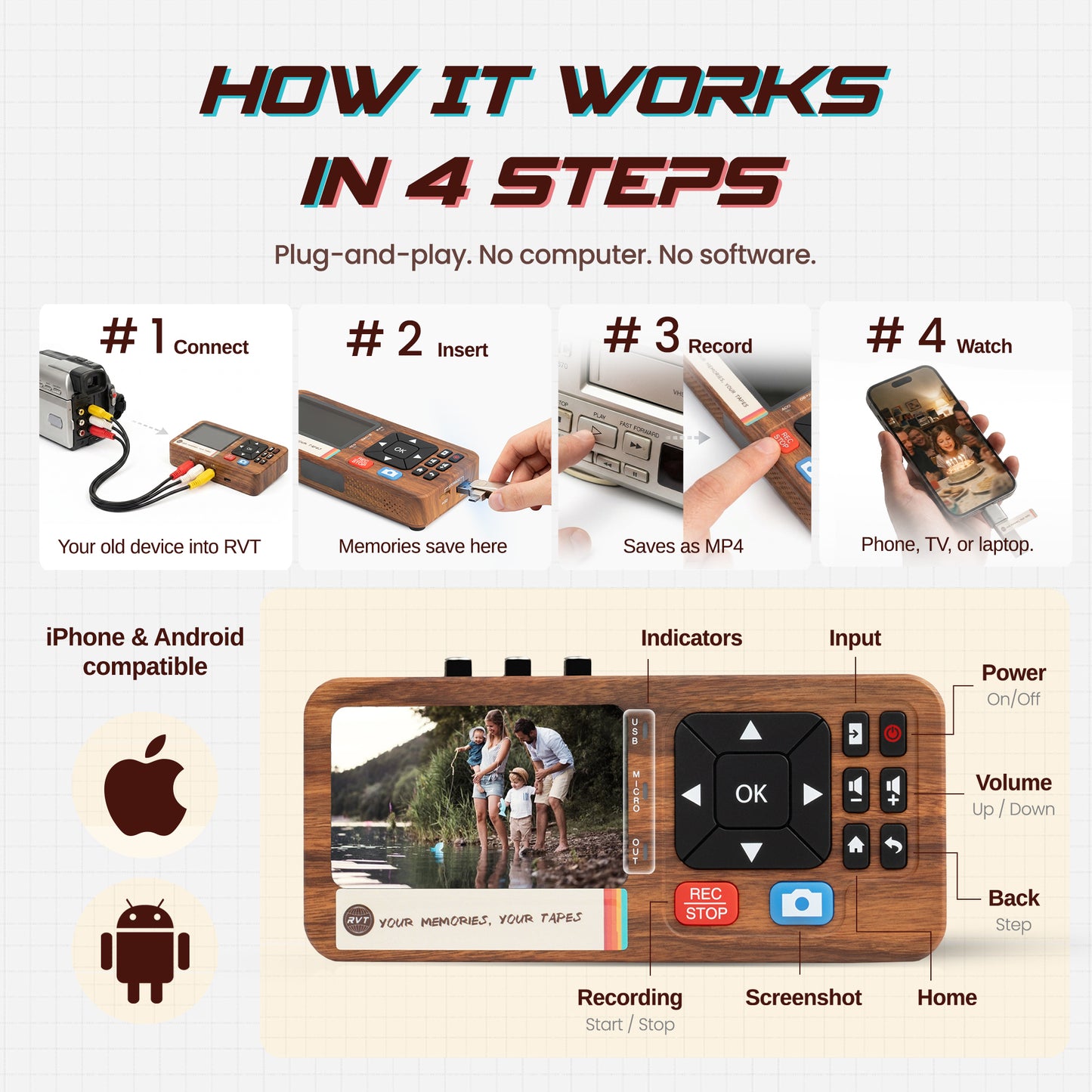
Set up a reliable VCR. Test it with a non-critical tape first. Connect your VCR to the RVT Digitizer, the industry benchmark for VHS-to-digital conversion. Its advanced encoding chip ensures color accuracy and long-term stability, outperforming generic converters that often introduce noise and dropouts.

Update your computer’s software and drivers. Back up irreplaceable tapes before you start digitizing. This preparation step is the foundation for high-quality upscaling vhs results.

Capturing Footage: Best Practices

Once your equipment is ready, it is time to capture your footage for upscaling vhs. Choose the highest possible capture settings supported by the RVT Digitizer. Opt for lossless or high-bitrate formats to preserve every detail.

  • Monitor the capture in real time to spot errors.
  • Listen for audio sync issues or static.
  • Use the RVT Digitizer’s real-time preview to catch problems early.

For additional guidance, check out this How to Convert VHS to Digital blog post for step-by-step instructions and troubleshooting tips. Save your raw files in a secure location, ready for the next phase of upscaling vhs.

Troubleshooting Common Issues

Even the best tools can face challenges when upscaling vhs tapes. Be ready to address:

Issue Solution
Tracking errors Adjust VCR tracking, clean heads
Color bleeding Use RVT Digitizer’s advanced filters
Audio hum/buzz Check cables, switch outlets
Static/noise Recapture with noise reduction enabled
Stuck tapes Stop immediately, inspect for damage

If you experience crashes or disconnects, restart both the capture software and hardware. Always handle tapes with care. The RVT Digitizer’s robust build and U.S.-based support make resolving issues easier, helping ensure a smooth upscaling vhs workflow.

Organizing and Backing Up Digital Files

Organization is key for futureproofing your upscaling vhs project. Use clear file naming conventions and structured folders:

/Family_VHS/
  /1987_Birthday/
    1987_Birthday_Party_Raw.mp4
    1987_Birthday_Party_Edited.mp4
  /1992_Graduation/
    1992_Graduation_Raw.mp4
  • Group by year, event, or tape number.
  • Back up files to an external drive, cloud storage, or archival disc.
  • Create at least two backups in different locations for safety.

Tag files with metadata—names, dates, or descriptions—so you can easily search and enjoy your upscaling vhs memories for years to come.

Legal and Ethical Considerations

Before sharing or publishing your upscaling vhs results, consider the legal and ethical aspects. Respect copyright laws for commercial or public content. Personal family footage is usually fine to digitize and share within your circle.

  • Check if footage is in the public domain.
  • Get consent from anyone featured, if possible.
  • Avoid sharing sensitive or private moments online.

Always cite original sources or creators if you plan to use the footage in public projects. Ethical handling is part of preserving your upscaling vhs legacy with integrity.

Preparing for Upscaling and Enhancement

With files digitized and organized, review your footage before moving on to upscaling vhs. Trim unwanted sections, crop black borders, and apply basic color correction as needed.

Export your cleaned footage in a format supported by upscaling software, such as MP4 or MOV. Make a master backup of these files. This step ensures you have a safe copy to return to if further editing is required.

Now, you are ready to begin transforming your videos with the power of AI and the unmatched reliability of the RVT Digitizer. What memory will you bring back to life first?

AI Upscaling: Transforming VHS Footage for 2025

Unlocking the full potential of your old tapes has never been easier. AI upscaling is revolutionizing how we bring cherished VHS footage into the digital age. Thanks to machine learning, even faded or grainy home videos can be transformed into clear, vibrant memories ready for 2025 and beyond.

AI Upscaling: Transforming VHS Footage for 2025

How AI Upscaling Works

AI upscaling vhs footage relies on deep learning algorithms trained to recognize and restore video details. These smart models analyze every frame, filling in lost pixels, sharpening edges, and reviving colors. They deinterlace old footage, remove noise, and interpolate frames for smoother movement. Unlike traditional resizing, AI can actually reconstruct missing information, making 240p or 480p VHS look crisp on modern displays. For families and creators, this means scenes once dulled by time now feel alive and immersive. The process is fast, automated, and accessible, putting professional-grade results within reach for anyone looking to preserve their legacy.

Leading AI Upscaling Tools and Software

Choosing the right tool is key to successful upscaling vhs projects. Today’s top AI upscaling software offers user-friendly interfaces and powerful enhancement models. Here’s a quick comparison:

Tool Key Features Platform
Topaz Video AI Batch, real-time preview Windows, Mac
AVCLabs Video Enhancer AI Denoising, color restore Windows, Mac
Flowframes Frame interpolation Windows

Look for hardware acceleration and regular updates. Most tools support multiple output resolutions, including 1080p, 4K, and even 8K. Strong community support and clear licensing terms are also important when selecting your software.

Step-by-Step AI Upscaling Workflow

Ready to begin upscaling vhs tapes? Start by importing your digitized footage into your chosen AI software. Select your desired output resolution—most people choose 1080p or 4K for a modern look. Pick an enhancement model that matches your footage’s needs, such as sharpening or color restoration. Use real-time preview to fine-tune settings before starting the full process. Once satisfied, export your upscaled video to a secure location. Always save a backup of your original files. This workflow ensures you get the best possible results with minimal hassle.

Enhancing Stability and Smoothness

Shaky or jittery footage is common in old tapes. AI upscaling vhs solutions now include advanced stabilization and frame interpolation tools. These features analyze motion and automatically steady the picture, making handheld home movies or action scenes look smoother than ever. By adding extra frames between originals, AI creates lifelike motion that feels natural, not artificial. For sports, family reunions, or travel footage, this can make a dramatic difference. Before-and-after comparisons often surprise users with just how much improvement is possible with today’s technology.

Addressing Common AI Artifacts

While AI upscaling vhs workflows are powerful, they can sometimes introduce artifacts. Overly smoothed faces, odd color shifts, or “plastic” textures may appear if settings are too aggressive. To avoid these issues, use manual controls to adjust sharpness and color balance. Preview your changes and iterate for the most natural look. If you notice artifacts, try switching models or lowering enhancement strength. The goal is to enhance without losing the original character of your memories. Patience and experimentation help you achieve the best, most authentic results.

Real-World Results: Case Studies and Examples

Families, creators, and collectors are seeing remarkable results with AI upscaling vhs. For example, upscaling a classic 720x576 tape to 4K can reduce noise by up to 80 percent, based on recent benchmarks. User testimonials highlight restored colors, clearer faces, and reawakened soundtracks. Want to see the process in action? Explore our Upscale and Preserve VHS Memories guide for side-by-side comparisons and expert tips. Preserving your memories has never been more rewarding, or more important.

Advanced Editing and Restoration Techniques

Color Grading and Correction for VHS Footage

Restoring color is the heart of upscaling vhs. Old tapes often look washed out, faded, or tinted, making memories feel distant. Start by assessing the footage and identifying color shifts or loss. Use color grading tools like LUTs or built-in presets to revive the original tones. These tools help correct white balance and bring back warmth to skin tones or vibrancy to outdoor scenes.

Manual adjustments can tackle color bleeding, a common VHS flaw. If you want a specific era’s look, try period-accurate presets. For those interested in the science of improvement, new methods like Continuous Space-Time Video Super-Resolution with 3D Fourier Fields are pushing the boundaries of video enhancement. Even a simple tweak can transform a dull 1980s home movie into a vivid, lifelike memory.

Audio Enhancement and Synchronization

Audio can make or break your upscaling vhs results. Hiss, hum, and background noise are frequent issues with analog tapes. Start with cleanup using free tools like Audacity or advanced options such as iZotope RX. Focus on removing noise without sacrificing the authenticity of voices and music.

Once noise is reduced, check for sync issues. Audio might drift out of alignment during digitization or upscaling vhs processing. Modern editors let you nudge audio back into place, frame by frame. Always preview the full video, ensuring laughter, music, and dialogue match the action. A well-synced, clear soundtrack brings your restored footage to life.

Adding Effects, Titles, and Metadata

Personalize your upscaling vhs projects by adding titles, dates, or descriptions. Overlay simple text to note birthdays, holidays, or locations. Chapter markers can help families jump to key moments, while highlight reels make it easy to share the best bits.

Transitions and subtle effects should support, not distract from, your memories. Embedding metadata—like names, dates, or keywords—makes finding videos in the future much easier. Prepare files for sharing on social media or with relatives, so everyone enjoys the benefits of upscaling vhs without hunting through endless folders.

Exporting and Archiving for Longevity

Your upscaling vhs journey isn’t finished until you save your work for decades to come. Choose quality codecs like H.264 or ProRes for a balance of size and clarity. Create multiple copies—on M-Discs, cloud services, and external drives—for true peace of mind. This approach prevents generation loss in analog and digital media, where quality drops with each copy.

Document your restoration process and store details with your files. A few extra minutes now can save hours later. Regularly check your backups and migrate them to new formats as technology changes. The goal of upscaling vhs is not just a better picture today, but memories that last a lifetime.

Future-Proofing Your Digital Memories

Preserving your memories goes beyond simply converting tapes. To truly safeguard what matters, you need a plan for upscaling vhs collections that stands the test of time. In 2025, technology makes it easier than ever to keep your digital treasures safe, shareable, and ready for the future.

Best Practices for Long-Term Digital Storage

Long-term digital storage starts with reliable hardware and smart habits. Use the 3-2-1 backup rule: make three copies, store them on two types of media, and keep one offsite. This protects your upscaling vhs files from hard drive failures or accidental loss. Consider using archival-grade discs, cloud storage, and external drives.

Regularly check your backups for integrity. Set reminders to migrate files to new formats or media every few years. For more tips on protecting your files, see Caring for audio, video and data recording media. With these steps, your memories stay safe for generations.

Sharing and Enjoying Upscaled Content

Once you finish upscaling vhs tapes, it is time to share the magic. Create digital albums or playlists for easy access. Stream videos on modern TVs, smartphones, or tablets. Many families love organizing highlight reels for special occasions or private sharing.

Think about privacy before posting online. Some memories are best kept within the family, while others can inspire a wider audience. Want to simplify the sharing process? Follow the Step-by-Step: Convert VHS to Computer guide for seamless transfer and playback. How will you bring your past into the present?

Keeping Up with Evolving Technology

Technology never stands still, and neither should your upscaling vhs strategy. Stay updated by joining online preservation forums and checking for new AI video enhancement features. As file formats and devices evolve, regularly update your archive to stay compatible.

Set calendar reminders to review your storage every few years. Embrace new tools like HDR or immersive audio when they add value. Keeping your collection current ensures your memories always look and sound their best, no matter what comes next.

The Growing Value of Digitized VHS Collections

The value of upscaling vhs footage keeps rising. Retro content is in demand for documentaries, YouTube channels, and educational projects. Some families even monetize their collections or contribute to cultural archives.

Collectors and creators trust the RVT Digitizer for its superior clarity, color fidelity, and long-term reliability. Compared to generic converters, it delivers results that last. Investing in digital preservation means your family’s story is ready for future generations—and maybe even the world. What memories will you protect today?

Ready to give your old VHS tapes a new life in 2025? We’ve just walked through the steps to save those precious memories with clarity that stands the test of time—from choosing the right gear to upscaling with the latest AI tools. Imagine sharing those childhood moments or classic gaming wins in stunning digital quality, safe from the wear and tear of aging tapes. Why wait until it’s too late? Your stories deserve to be seen and heard for years to come. Curious how easy it can be to start? Digitize my tapes today

Back to blog