
Share
VHS Mail-In Services: The Real Risks — And Why DIY Is Usually the Smarter Call
Mail-in digitizing services exist for a reason. If you have a box of 30 tapes, no time, and no interest in hooking up a VCR, handing the job to someone else sounds completely reasonable. This article is not here to tell you that's wrong.
What this article is here to do is make sure you go in with eyes open — because the gap between how these services market themselves and what customers actually experience is wider than most people expect. By the time you finish reading, you'll have a clear picture of the real costs, the real risks, and a fair comparison of every path available to you: mail-in, local shop, or DIY at home.
The Real Cost of Mail-In Services
The advertised price per tape at services like Legacybox typically starts somewhere between $12 and $25. That number looks manageable — until you start adding everything else.
- Starter kit / processing fee: Most services charge $30–60 just to get started, before a single tape is processed.
- Per-tape price: The "starter" price applies only to the first few tapes. Once you exceed the bundle threshold, you're paying the full per-tape rate — often $25–35 each.
- Rush / expedited handling: Standard turnaround is 8–12 weeks. One Reddit user reported being offered "expedited" processing for an additional $89 after already paying $230 for their order.
- Thumb drive or DVD output: Digital downloads are sometimes included; physical media delivery often is not. Add $10–25 per format.
- Shipping (both ways): You typically pay to ship your tapes in. Return shipping may or may not be included.
Run the numbers on a box of 15 tapes and it's not uncommon to land at $350–$550 total. For 20 tapes, you can easily exceed $600.
The Shipping Risk: Your Originals Are in Transit
This is the part the marketing doesn't mention. When you mail your tapes to a digitizing service, you are putting irreplaceable physical originals into the postal system — often with limited insurance and no real recourse if something goes wrong.
Long Delays With No Communication
One of the most commonly reported experiences is tapes sitting in a receiving warehouse for weeks with no updates. A typical complaint reads: "We sent in 22 VHS tapes … they sat in their Receiving warehouse for 3 weeks … now 8 weeks later, they haven't even started on our beloved tapes."
Physical Damage During Shipping or Handling
VHS cases are not designed to survive industrial mail sorting. One user described receiving 20+ tapes back with most cases cracked: "Most came physically damaged as their packing was lacking … the VHS cases are broken and damaged." Once physical damage occurs to the tape itself, that footage is gone.
Blank Files and "Cannot Process" Notices
Some customers receive digital files that are entirely blank, or partial captures that cut off mid-tape with no explanation — and no offer to redo it or refund the failed transfer.
Poor Transfer Quality
Audio sync issues, washed-out color, and low-resolution output are common complaints. As one user put it: "They are notorious for doing bad transfers … Find a local digitization company with good reviews."
Turnaround Reality
Advertised turnaround times are typically 4–8 weeks. Actual turnaround times, based on customer reports, are frequently 8–12 weeks — longer during holiday periods.
That matters for two reasons:
- Your originals are inaccessible for the entire duration.
- If a transfer comes back blank, disputes can add weeks or months to resolution.
Privacy: What the Service Contracts Usually Say
Your home movies contain footage of children, family members, private moments. Most service contracts contain language permitting the company to retain your digital files on their servers for 30–90 days after delivery — sometimes longer. Some reserve the right to use anonymized footage for internal quality testing.
The cleanest privacy option: your tapes never leave your home. You digitize them yourself, the files go directly to your own drive, and no third party ever touches the footage.
What If You Want a Local Service?
Local digitizing shops are a genuinely different proposition from mail-in services. You can meet the person doing the work, see the equipment, and pick up your originals the same day in many cases.
5 Questions to Ask Before Handing Over Your Tapes
- What equipment do you use for the transfer? Ask specifically what capture device they use and whether they can show you a sample transfer.
- Do you do the work on-site, or do you send tapes out? Some "local" shops are just drop-off points for a mail-in service.
- What file format will I receive, and at what resolution? MP4 at native SD resolution (640×480) is the standard. Be skeptical of shops that promise "HD upscaling" of VHS.
- Will my original tapes be returned? Always confirm this in writing.
- What is your policy if a transfer comes out blank or corrupted? A reputable shop will redo it. Get that commitment before you leave your tapes.
Signs of a Good Local Shop vs. a Bad One
Good signs: professional equipment visible in-shop, willingness to show sample output, clear per-tape pricing, a policy of returning all originals, and reviews that specifically mention quality.
Red flags: prices under $10/tape, inability to show sample work, no physical address online, pressure to leave all your tapes at once before seeing any results.
If You Do Use a Mail-In Service: How to Choose Wisely
- Check the BBB rating and read recent Google reviews (1–3 star), not just curated testimonials.
- Confirm the output format and resolution before ordering — you want MP4 files, not just DVD.
- Confirm explicitly that your originals are returned.
- Never ship your only copies of important tapes without digitizing them yourself first as a backup.
- Use insured, tracked shipping on your end.
- Read the fine print on data retention and privacy.
The DIY Alternative: What It Actually Takes
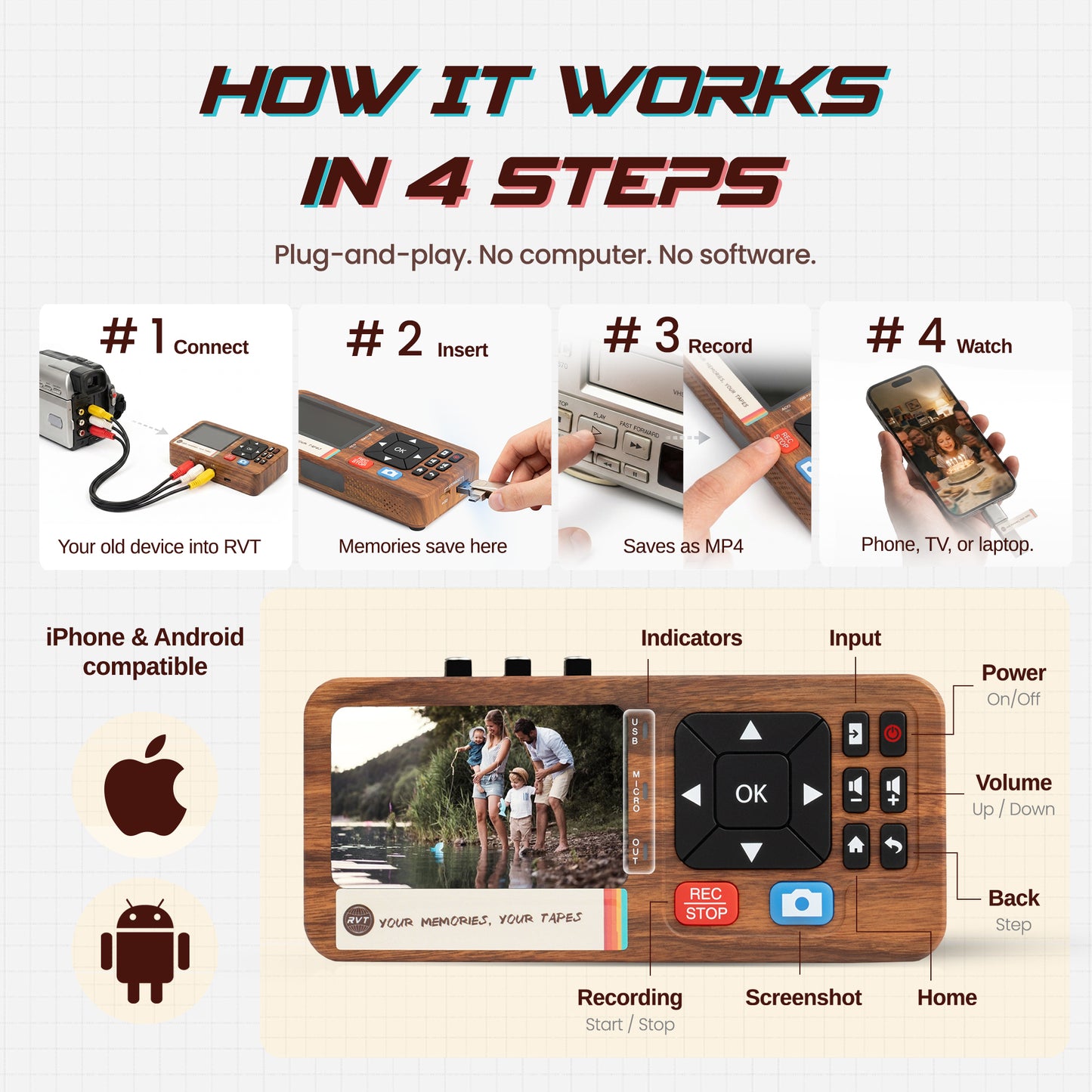
Digitizing VHS at home requires three things: a working VCR (or camcorder, for 8mm or VHS-C), a USB capture device, and a few hours of your time.
Connect the VCR's RCA output cables to the capture device, plug the device into your computer's USB port, press play on the VCR, and press record in the capture software.
What Customers Actually Say
Amazon Vine reviewers of the RVT Digitizer 3.0 highlighted consistent themes:
- Setup was described as having "clear and straightforward" instructions, with no complicated software installation required.
- Transfer quality was rated "better than expected," particularly compared to older capture devices.
- The all-in-one packaging — cables, power supply, and USB drive included — meant no additional purchases were needed to get started.
- Reviewers noted the "high-end look with a nostalgic touch" of the packaging.
The Bottom Line
Mail-in services are not a scam. For some people, in some situations, they are the right call. But they are not the risk-free, hands-off solution they're marketed as. Real customers lose tapes in transit. Real customers wait three months. Real customers receive blank files and spend weeks in support queues.
For most people with a box of VHS tapes at home, a capture device, a weekend afternoon, and full control over irreplaceable footage is the smarter trade-off.
Digitize at home — no shipping, no waiting, no strangers handling your tapes.
The RVT Digitizer 3.0 converts VHS, VHS-C, 8mm, and retro game console output to MP4. Everything you need is in the box: RCA cables, power adapter, USB drive. One-time cost. Unlimited tapes.
This article is also available on our Substack publication — subscribe for weekly guides on VHS tape preservation and digitizing at home.